

Download Canasta – Strategy Card Game, Canasta Formation, Versatile Playing Options
Overview
Canasta is a strategic card game designed for players who appreciate tactical depth and mental challenge. The game centers on forming high-scoring combinations of cards, particularly the signature canasta—a set of seven cards of the same rank. This objective-driven gameplay demands foresight, planning, and adaptability, making it ideal for fans of competitive card strategy. The game is crafted to simulate real-world card dynamics, offering a rich experience that blends luck with calculated decision-making.
Target users include casual gamers seeking engaging pastimes, as well as seasoned card enthusiasts who enjoy games requiring long-term planning. The game’s structure supports both single-player and multiplayer formats, enabling users to practice against AI opponents or engage in online matches. This dual approach ensures accessibility for players at different skill levels, from beginners to advanced strategists.
Developed by Bitz & Pixelz Games, Canasta reflects a focused effort to deliver a polished, rule-accurate simulation of the classic card game. Although specific details about the developer’s background were not provided, the game’s consistent updates and attention to technical stability suggest a dedicated team. The release on April 15, 2024, marks a refined iteration with improved compatibility and performance, particularly for Windows Vista users.
Within the digital gaming ecosystem, Canasta fills a niche for strategy-focused card games that emphasize logic over randomness. It offers a reliable platform for players to test their skills, sharpen decision-making, and enjoy a mentally stimulating experience. The game’s enduring appeal lies in its balance between complexity and accessibility, making it a valuable addition to any strategy game library.
Key Features & Functionality
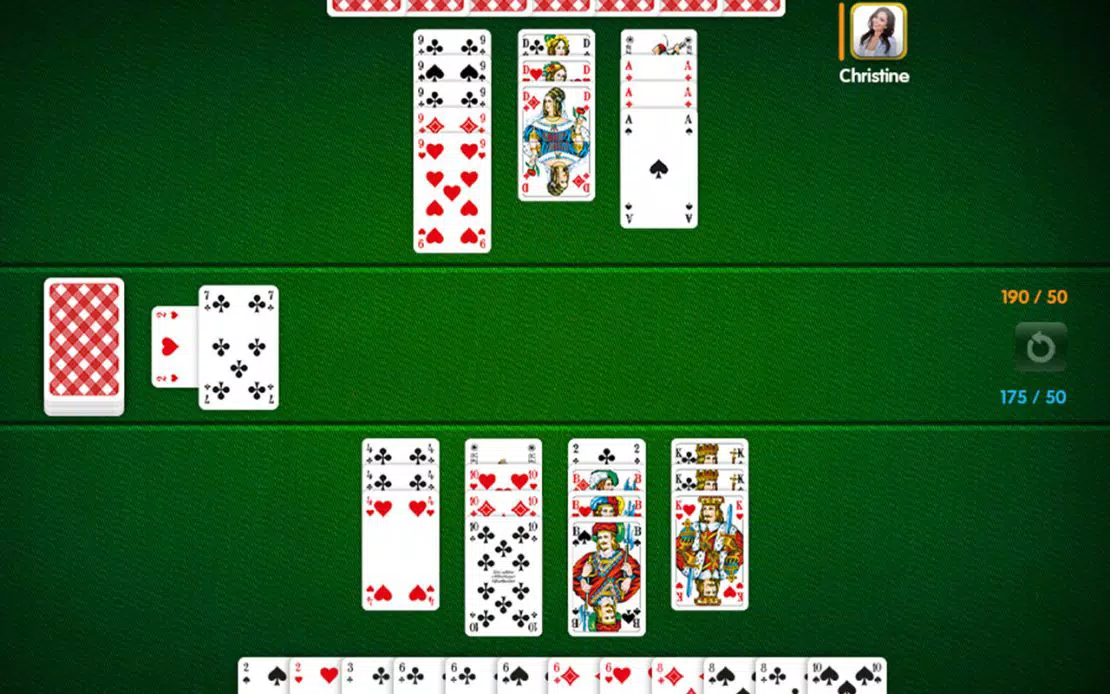
- Canasta Formation – The core mechanic involves creating sets of seven identical cards, such as seven jacks or seven sevens. Successfully forming a canasta grants significant point bonuses and is a major milestone toward winning. Players must carefully manage their hand, deciding when to hold, meld, or discard cards to build toward this goal.
- Multiple Play Modes – The game supports solo play against AI and online multiplayer through dedicated lobbies. This flexibility allows users to practice at their own pace or challenge real opponents, adapting the experience to personal preferences and schedules.
- Comprehensive Help File – A built-in guide explains the rules, scoring system, and strategic nuances of Canasta. This resource is especially useful for newcomers, offering a clear, step-by-step breakdown of gameplay mechanics, helping users transition from unfamiliarity to confidence.
- Enhanced Stability & Compatibility – Version 5.1.0.2 includes bug fixes for network play and improved support for Windows Vista. These updates ensure smoother gameplay, reduced disconnections, and better overall reliability, particularly during online matches.
For example, a player aiming to build a canasta of kings must balance discarding high-value cards while preserving lower ones for future melds. The help file assists in understanding when to draw from the stock versus the discard pile, a critical decision point in the game. Similarly, online players benefit from stable connections, enabling uninterrupted competition and fair play.
Interface, UX & Performance
Canasta features a clean, intuitive interface designed for ease of navigation. Card layouts are clearly organized, with visual cues indicating valid melds, available moves, and turn status. The game’s visual style emphasizes clarity and functionality, minimizing distractions while maintaining a classic card game aesthetic.
Navigation is straightforward, with actions such as drawing, discarding, and melding executed through simple clicks. The flow from turn to turn is smooth, and the game provides clear feedback on each move, reducing confusion and enhancing user confidence. Although the developer did not list formal performance metrics, the game’s lightweight size of 10.5 MB suggests efficient resource usage.
Performance across device categories appears consistent, with the game running smoothly on systems meeting basic Windows requirements. Responsiveness is strong, with minimal lag during card selection and turn transitions. Stability is notably improved in version 5.1.0.2, particularly in networked environments, where previous versions experienced connection issues. The game maintains a stable state during extended play sessions, indicating solid code architecture and optimization.
Platform Compatibility & Technical Requirements
Canasta is available on the Windows platform, with a software version of 5.1.0.2. The application has a file size of 10.5 MB, making it a lightweight download suitable for systems with limited storage. It is designed to run on Windows Vista, with enhanced compatibility confirmed in this release.
Although the developer did not specify minimum OS requirements or hardware specifications, the game’s small footprint and stable performance suggest broad compatibility across standard Windows installations. Users are advised to ensure their system meets baseline Windows functionality to avoid installation or runtime issues. The game is free to download and install, with no in-app purchases or subscription models reported.
Pros and Cons
- Free to download and use with no hidden costs
- Supports both single-player and online multiplayer modes
- Comprehensive help file aids beginners and refreshers
- Improved network stability and bug fixes in latest version
- Lightweight file size (10.5 MB) for fast installation
- Platform limited to Windows; no mobile or macOS availability disclosed
- Specific system requirements not listed
- No mention of accessibility features or customization options
- Gameplay may feel limited for users seeking frequent updates or new content
- Visual design is functional but not visually distinctive
FAQ
Is Canasta safe to download?
Yes, the game is distributed by Bitz & Pixelz Games and is free from known malware. The developer has maintained a stable release history, with version 5.1.0.2 focusing on bug fixes and compatibility.
Can I play Canasta offline?
Yes, the game supports solo play against AI opponents, allowing full gameplay without an internet connection.
Is the game updated regularly?
The latest version, 5.1.0.2, was released on April 15, 2024, and includes stability improvements. However, the update frequency is not publicly disclosed.
Does Canasta require an internet connection?
An internet connection is only needed for online multiplayer matches. Offline play is fully supported.
Is Canasta available on Android or iOS?
Currently, the game is only confirmed for Windows. No information about mobile versions was provided by the developer.
Final Thoughts
Canasta delivers a focused, rule-accurate experience for fans of strategic card games. Its core mechanic—forming canastas—provides a satisfying challenge that rewards foresight and planning. The inclusion of a detailed help file ensures accessibility for newcomers, while the stable online play and lightweight design appeal to experienced users.
While the platform is limited to Windows and no mobile versions are confirmed, the game remains a solid choice for desktop players seeking a mentally engaging card experience. Its free model, combined with reliable performance and clear objectives, makes it a valuable tool for strategy enthusiasts.
Download Canasta now


